Find duplicates, leftover installers and blurry photos in a folder
What it does
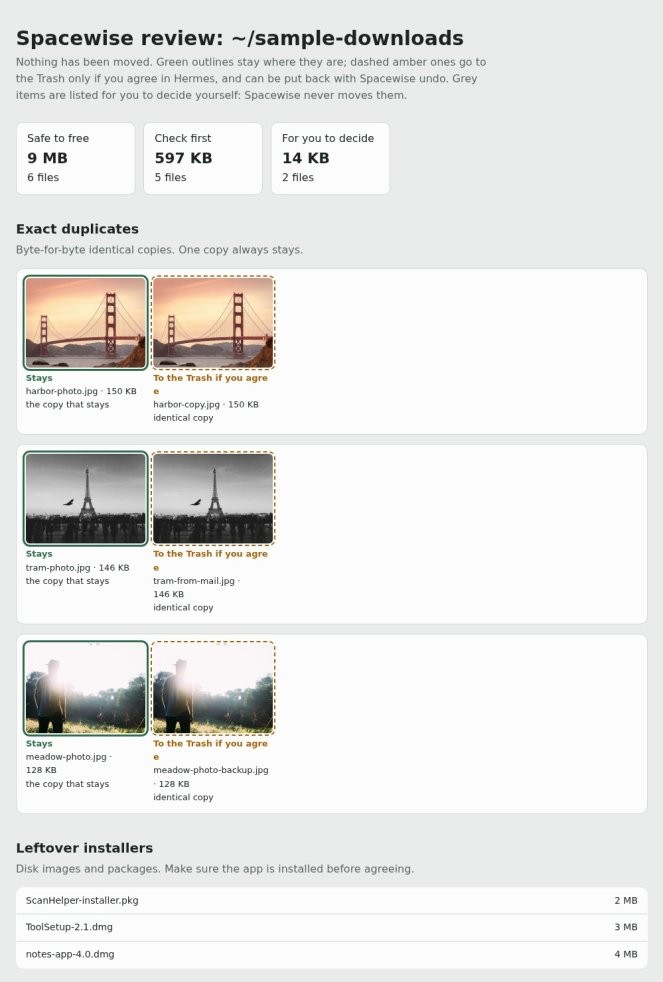
Hermes Agent uses the spacewise plugin to scan a folder you name for three kinds of clutter: exact duplicates, where one copy is always kept; leftover .dmg and .pkg installers; and similar or blurry photos.
It builds a thumbnail page showing what would stay and what would go. Any move goes through Hermes Agent's approval prompt, lands in the Trash, and can be put back.
Why it's worth it
The plugin lists what is taking space in a folder you name, for you to check. Each move goes through Hermes Agent's approval prompt, to the Trash, where it can be put back.
Step by step
Paste it into Hermes Agent and swap the highlighted parts for your own details.
Before you start The spacewise plugin installed with hermes plugins install spacewise.
Get Hermes Agent to:
- Confirm the spacewise plugin is installed before scanning anything.
- List every leftover .dmg and .pkg installer in my [folder path].
- Find similar and blurry photos in my [photo folder path] and list each one so I can check it.
- Build the thumbnail page showing what stays and what would go, and tell me where to find it.
- Ask me for approval before moving anything, and wait for my yes on each group of files.
- Move only the items I approve to the Trash, so I can put them back.
- Report back with how many files were moved to the Trash.
Expected resultYou end up with a thumbnail page showing what stays and what would go, before anything is moved.