Check your backup AI models before Hermes Agent needs them
What it does
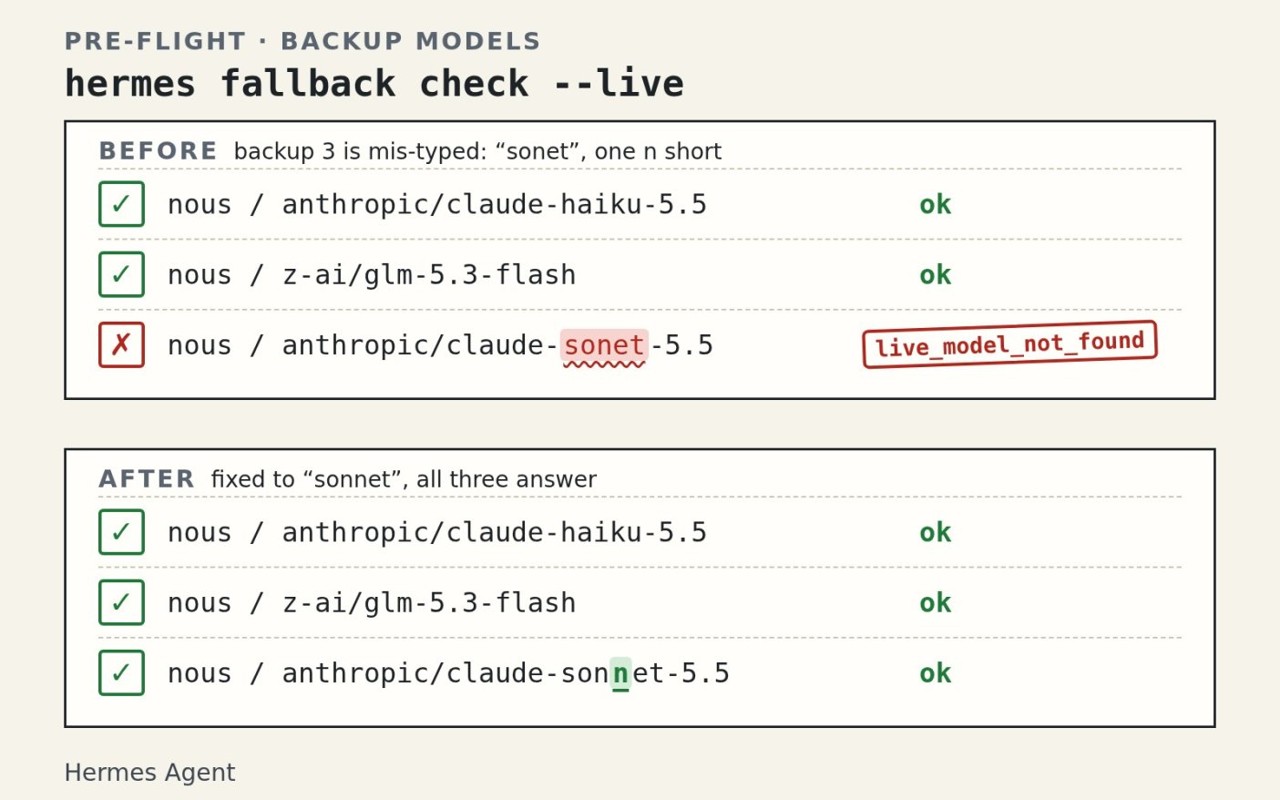
Hermes Agent checks each backup model you set by resolving it and its credentials. The default run sends no request. Adding --live sends one short request to each backup, on its own provider and model. In the test reported for the check, a deliberately mis-typed backup model name got caught.
Why it's worth it
The check catches a mis-typed backup model name, and the default run sends no request. --json prints one record per backup, never the credentials, and a script can act on the exit code.
Step by step
Paste it into Hermes Agent and swap the highlighted parts for your own details.
Before you start Hermes Agent 0.23.2 or newer, with my backup AI models already saved.
Get Hermes Agent to:
- Check my installed version, and run hermes update first if it is older than 0.23.2, since the fallback check ships in that release.
- Run hermes fallback check on my saved backups, which sends no requests, and report the result for each one.
- Flag any backup that is not usable, including one with a misspelled model name, and tell me which backup needs fixing.
- Stop before any live run and ask me to approve hermes fallback check --live for [number of backups] backups, since each one sends a request to a live service.
- After I approve, run hermes fallback check --live and note which backups answered and which did not.
- For each backup that is not usable, propose the fix and wait for my go-ahead before changing anything in [config file location].
- Report back with how many backups are usable, which need attention, and whether the exit code was 1, so I know if a script would act.
Expected resultEach backup is checked, and any backup that is not usable makes the command exit with code 1.